If you want to learn how to copy youtube comment link posts or individual text replies, you have probably noticed that sometimes it is far more entertaining to scroll through the YouTube comments section than it is to watch the actual video. The comment section can get wild; you will frequently run into weird, hilarious responses that make you laugh out loud, alongside plenty of cringeworthy takes.
It is a shame that YouTube previously removed the dedicated share button for individual comments. This feature was incredibly useful, especially when you stumbled upon a comment packed with valuable insights and wanted to forward it to a friend.
Fortunately, Socialraid is here to share a clever little trick so you can still easily learn how to copy youtube comment link today. Every single comment on the platform possesses a unique permalink. When utilized, this link opens the video and automatically pins that specific comment right at the top of the feed.
Important Note: Please keep in mind that there is currently no functional method to copy a direct link from a comment using the official YouTube app on Android or iOS devices. This guide focuses entirely on desktop browsers.
Why Use YouTube Comment Permalinks? (Common Use Cases)
Isolating a specific comment link is incredibly valuable for content creators, digital marketers, and casual viewers alike. Instead of telling someone to “scroll down and find a specific username,” a direct link saves precious time and keeps the conversation focused. Here are a few practical scenarios where mastering how to copy youtube comment link shines:
* **Highlighting Customer Feedback:** If you run a business or brand and a user leaves a glowing testimonial under your video, copying that specific link allows you to share it with your team or feature it as social proof.
* **Archiving Vital Information:** Many users post helpful technical breakdowns, video chapters, or detailed corrections in the comments. Direct links help you bookmark these crowdsourced resources for future reference.
* **Curating Social Media Content:** Digital marketing teams frequently use individual comment URLs to track trending community interactions, creating reaction material or compiled posts for platforms like TikTok and Instagram.
Step-by-Step Guide for PC and Laptop Browsers
Follow these simple steps to locate and copy any comment URL using your computer:
STEP 1: Launch YouTube
Open your preferred web browser on your computer, type https://www.youtube.com/ into the address bar, and hit Enter.
STEP 2: Locate the Target Comment
Navigate to the specific video containing the message you want to share. Scroll down past the video description to load the comments section and locate the exact text.
STEP 3: Click the Comment Timestamp
Simply left-click on the timestamp of the comment. The timestamp is the small gray label next to the user’s name that displays when the comment was published (e.g., 2 hours ago, 1 year ago). Clicking this text will automatically reload the YouTube page, refreshing the feed to highlight your selected comment.

STEP 4: Copy the URL from the Address Bar
Look at the address bar at the very top of your browser. The displayed link has now updated to include the comment’s unique permalink. Highlight and copy this entire URL string.
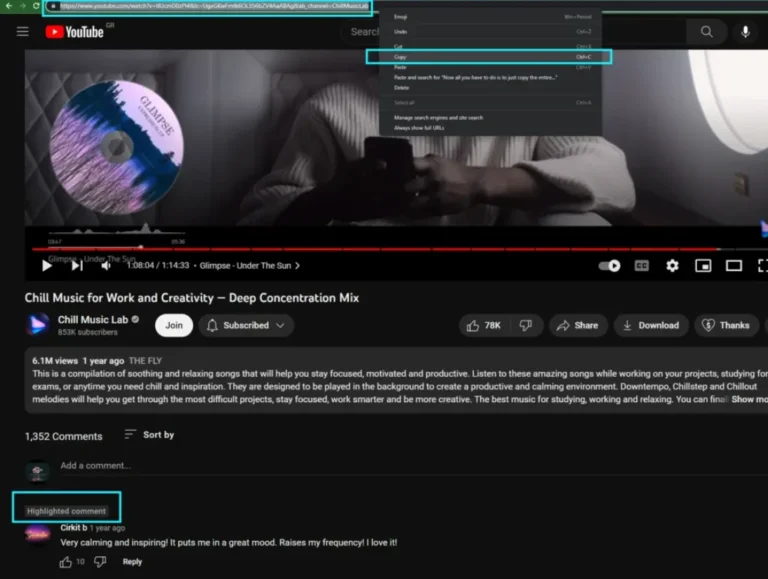
You can now share this direct YouTube comment link with anyone, anywhere. When clicked, it will open the video and isolate the selected comment at the very top of the section, directly underneath the main video description, making it incredibly easy for others to spot.
Shortcut: How to Copy a YouTube Comment Link via Right-Click
If you want to save time and avoid reloading the entire web page, you can use this quick alternative:
Scroll down to the comment you wish to link to.
Perform a right-click directly on the comment’s timestamp.
Select Copy link address (or Copy Link depending on your browser) from the drop-down context menu.
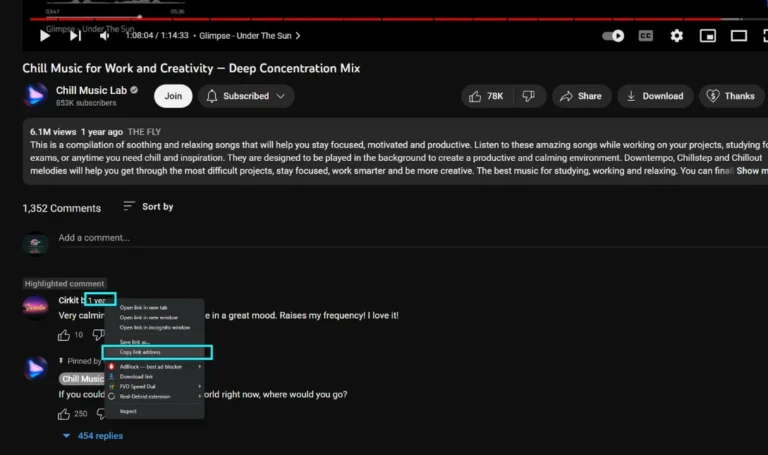
4. Paste your generated URL anywhere you like, such as a document, notepad, or direct chat message.